

Messy workspaces often stem from bulky power bricks, tangled monitor cords, and dangling charging wires under desks. Choosing among the Best Clamp on Cable Organizers in September 2026 gives remote workers and gamers an instant way to clear floor clutter without putting permanent screws into furniture.
Standard adhesive wire channels frequently peel away under the weight of heavy surge protectors, creating unexpected drops and damaged connectors. Modern clamp designs eliminate that frustration by providing stable, drill-free support across various tabletop thicknesses.
We evaluated 7 leading models from top brands such as NODOCA, Litwaro, Univivi and more across the $13.99 – $39.99 spectrum. You can also explore our general guides for broader workspace setup and office layout ideas.


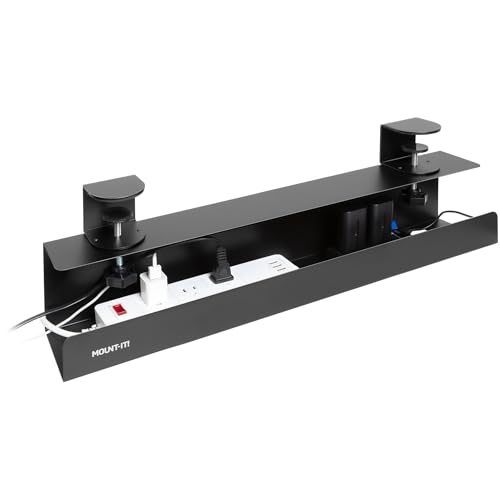
Clamp Thickness Compatibility and Clearance Depth
The primary specification to examine before purchasing any under-desk basket is the clamp opening range. Most quality organizers accommodate desk thicknesses between 0.4 inches and 2 inches, which covers standard engineered wood, solid hardwood, and standing desk platforms. If your desk has an unusually thick bevel or a shallow support frame underneath, measure the edge carefully before ordering.
Depth clearance behind the desk edge is equally critical for a secure grip. Many C-clamps require at least 2 inches of flat underneath surface to sit flush against the bottom of the table. Desks with structural crossbars, support beams, or built-in privacy skirts right along the perimeter might block the clamp pads from making full contact.
A reliable rule of thumb is to measure your desktop thickness with a ruler and verify an unobstructed lip of at least 2.5 inches. Doing so prevents wobbling and avoids the need to mount the tray at an awkward angle.
Weight Capacity and Structural Rigidity
Cable baskets must hold substantial equipment, including multi-outlet surge protectors, heavy laptop power bricks, and excess cords. Typical consumer models support between 11 and 20 pounds without sagging or bowing in the center. Choosing a rack rated for at least 15 pounds provides plenty of headroom for future peripheral upgrades.
Structural deflection happens when thin sheet metal or weak joints bend under sustained loads. Premium steel and thick aluminum trays maintain their horizontal profile even when loaded with multiple high-wattage power supplies. Welded joints and reinforced side brackets distribute downward pressure evenly across the mounting points.
If you plan to store multiple transformer bricks or high-output docking stations, avoid flimsy plastic trays that distort over time. Solid carbon steel construction ensures the unit remains level and prevents components from shifting when you raise or lower an adjustable standing desk.
Tray Dimensions and Usable Volume
The physical footprint of the organizer dictates how many power strips and loose cables you can conceal. Compact units span 14 to 17 inches in length, making them ideal for minimalist single-monitor workspaces. Larger setups with dual monitors, audio interfaces, and external drives benefit from 24-inch to 36-inch trays that accommodate wide power strips with spaced-out outlets.
Tray width and depth determine whether oversized AC adapters can rest flat inside the compartment. Look for a basket with at least 4.5 inches of internal width so bulky plugs do not push against the underside of the table. Generous vertical clearance also allows you to plug devices in directly without bending cord strain reliefs at severe angles.
When planning your setup, list all devices that require permanent power under the desk and total their physical footprint. Matching your total strip length to an appropriately sized tray keeps cords neatly contained in one central location.
| Tray Length | Typical Capacity | Ideal Desk Width | Best Use Case |
|---|---|---|---|
| 14 to 17 inches | 10 to 15 lbs | 36 to 48 inches | Single laptop or basic monitor setup |
| 23 to 25 inches | 15 to 20 lbs | 48 to 60 inches | Dual monitors with power strip and dock |
| 36 inches | 15 to 20 lbs | 60 inches or wider | Full gaming rig or multi-device creative desk |
Material Durability and Heat Dissipation
Power adapters, docking stations, and surge protectors generate noticeable heat during long work sessions. Open wire mesh and perforated metal designs allow ambient air to circulate freely around hot components. This passive cooling prevents thermal throttling and protects sensitive electronics from premature heat degradation.
Solid trays or dense fabric sleeves offer cleaner visual concealment but can trap warm air around power bricks. If you opt for an oxford fabric or solid metal enclosure, ensure it features ventilation slots or flame-retardant certification. Rust-resistant powder coatings or aircraft-grade aluminum finishes also prevent corrosion in humid environments.
For workstations running gaming rigs or intensive editing setups, open mesh metal trays offer the best balance of structural strength and ventilation. They also collect less ambient dust, which reduces maintenance over time. Explore our furniture and comfort collection for complementary desk accessories.
Inward vs Outward Orientation Flexibility
Dual-facing mounting versatility gives you control over how accessible your power strips remain after installation. An inward-facing orientation points the open side of the basket toward the wall or under the desk, completely hiding plugs from view. This orientation provides the cleanest aesthetic for offices with open floor plans or minimalist standing desks.
An outward-facing orientation positions the open channel toward your seating position for quick access. This layout is especially useful if you frequently plug and unplug temporary chargers, camera batteries, or test gear. Reversible clamp brackets let you change configurations whenever your workflow demands it.
When evaluating hardware, check whether the bracket attaches symmetrically to the basket frame. Trays with reversible screw mounts or ambidextrous clip slots let you flip the unit in minutes without dismantling the entire cable layout.
Desktop Surface Protection and Padding
Clamp-on hardware must secure firmly to the desk without scratching, denting, or stripping delicate surface finishes. High-quality organizers feature integrated rubber, silicone, or dense EVA foam pads on both the upper and lower clamp surfaces. These protective barriers cushion the clamping force against solid wood, veneer, laminate, or glass.
Bare metal clamps can exert intense pressure on soft woods like pine or scratch delicate powder-coated steel frames. In addition to preventing gouges, soft rubber grips increase friction, which keeps the organizer from shifting when you tug on cables.
Inspect the clamp design to ensure pads come pre-installed or include durable adhesive backings. If your desktop is made of tempered glass, verify that the manufacturer explicitly rates the clamp for glass furniture to avoid stress cracking.
Cable Routing Cutouts and Pass-Through Channels
Dedicated side holes, rear slots, and open side channels make cable routing smooth and organized. Well-placed openings allow thick monitor power cords and USB lines to exit directly toward their destination without bunching up over the top rim. This keeps individual cables separated and prevents tangled knots inside the basket.
Multiple pass-through ports also simplify the process of tracing individual cords when swapping out hardware. Baskets with round grommet holes or wide side notches let you thread cable ties and hook-and-loop straps directly through the frame.
Look for smooth, deburred edges on all internal routing holes so cable jackets do not fray over time. Rounded metal cutouts protect fragile data lines, such as braided display cables and sensitive optical audio leads.
Assembly Speed and Tool-Free Mounting
Modern clamp-on organizers emphasize fast, tool-free installation that takes only a few minutes. Hand-tightened thumb screws or rotary knobs allow you to lock the clamps into place without needing drills, wrenches, or screwdrivers. This eliminates the risk of accidentally drilling through the top of an expensive standing desk.
Multi-piece trays that arrive disassembled should feature straightforward interlocking tabs or minimal screw connections. Clear alignment guides ensure you can join extended sections together rigidly before securing the entire assembly to your desk.
If you move your desk frequently or adjust your home office layout, tool-free removal is an enormous advantage. You can loosen the clamps, relocate the basket, and retighten it in seconds without leaving permanent screw holes.
Cable Concealment vs Accessibility
Finding the right balance between clean visual concealment and easy cable accessibility depends on your daily habits. Deep baskets with high front walls hide messy cord bundles from room sightlines, keeping your space looking spotless. However, deeper walls make reaching small power switches or individual USB plugs slightly more difficult.
Shallow, open-wire designs provide instant visibility, making it easy to plug in laptop chargers or spot LED indicator lights. If you maintain a static workstation where cables rarely change, deeper containment provides a neater aesthetic.
For shared family desks or dynamic creative stations, consider models with fold-down fabric flaps or wide front drop openings. Discover additional setup ideas in our home and living section to complete your room aesthetic.
Why You Should Trust Us
Our product evaluation process relies on rigorous technical analysis and objective feature comparison. We examine structural specifications, clamp dimensions, load ratings, and thermal airflow properties across popular workspace organizers. By comparing real-world dimensional data against manufacturer claims, we eliminate marketing hype and focus on genuine utility.
We track design revisions, material upgrades, and hardware improvements across multiple price tiers in the category. Our editorial team prioritizes models that balance durable carbon steel construction, dependable clamping force, and surface protection.
This guide is continuously updated through our automated platform to reflect current product availability, updated model specifications, and market changes. Our goal is to provide honest, transparent buying advice to help you build an efficient, clutter-free desk setup.
Final Thoughts
Selecting the right under-desk organizer transforms a chaotic tangle of wires into a sleek, productive workstation. If you want the best overall combination of structural strength and compact convenience, the NODOCA No Drill Under Desk Cable Management Tray delivers robust carbon steel construction and an impressive 20-pound capacity for everyday desk gear.
Budget-conscious shoppers looking for reliable performance at an approachable price point should consider the Under Desk Cable Management Tray No Drill. It features dual side routing holes, protective rubber pads, and dependable carbon steel mesh that keeps power strips elevated without breaking the bank.
For expansive workstations or power-heavy dual-monitor desks, the Univivi No Drill Under Desk Cable Management Tray offers an impressive 36-inch length and flame-retardant fabric support to hide oversized power supplies. Alternatively, multi-desk setups benefit from the FN POWER Under Desk Cable Management Tray 2-Pack, which provides lightweight rust-free aluminum trays for maximum placement flexibility. You can learn more about practical interior accents in our beginner guide to using a runner rug.
Frequently Asked Questions
How do clamp-on cable trays protect desk surfaces from scratches?
Quality clamp-on organizers include pre-installed silicone, rubber, or high-density EVA foam pads on both the upper and lower clamp surfaces. These soft barriers cushion the metal clamp against wood, laminate, or glass while providing extra grip that stops the tray from sliding when wires are pulled.
Can I install Best Clamp on Cable Organizers on a glass desktop in 2026?
Yes, many clamp-on cable trays are engineered specifically for glass desks because they require no drilling or permanent adhesive. Always verify that the clamp features wide rubber pads to distribute pressure evenly across the tempered glass surface without creating stress points.
What is the typical weight limit for an under-desk cable basket?
Most steel and aluminum clamp-on cable trays support between 11 and 20 pounds of equipment. This capacity easily accommodates multi-outlet surge protectors, heavy laptop chargers, USB docking stations, and long cable bundles.
How thick can my desk be for a clamp-on cable organizer?
Standard clamp-on trays support desktop thicknesses ranging from 0.4 inches up to 2 inches. Always measure the thickness of your tabletop and ensure there are at least 2 inches of flat depth along the rear lip for the clamp mechanism to attach securely.
Are metal wire mesh trays better than solid fabric organizers?
Metal wire mesh trays offer superior ventilation and passive cooling for hot power bricks, which prevents thermal throttling. Fabric organizers provide a softer visual aesthetic and complete cord concealment, but you should ensure they use flame-retardant materials like 600D oxford cloth.
Can clamp-on cable organizers be installed facing outward?
Yes, many modern organizers feature reversible clamp mounts that allow inward or outward orientation. Facing the opening outward makes it effortless to plug in temporary chargers or adjust power cables without crawling underneath the desk.
How do under-desk trays improve cable management on standing desks?
Under-desk trays keep all power adapters, docks, and surge protectors attached directly to the moving desktop frame. This setup means you only need a single power cable running down to the wall outlet, eliminating cord tension when the desk raises or lowers.
Will large power bricks cause heat buildup inside an under-desk basket?
Open-frame steel and wire mesh baskets maintain continuous airflow around power supplies to prevent excessive heat buildup. If you have several high-draw adapters, avoid tightly wrapping them together and leave small air gaps between bricks inside the tray.
Do I need any tools or screws to assemble and mount these organizers?
Most clamp-on models feature tool-free rotary knobs that tighten securely onto the desk edge by hand within minutes. Extended two-piece models may include a few small bolts and an included hex key to join the tray sections together before mounting.
How do Best Clamp on Cable Organizers prevent tripping hazards in 2026?
By lifting power strips, extension cords, and dangling computer wires off the floor, these organizers eliminate loose cords near your feet. This setup also clears floor pathways so robotic vacuums can clean underneath workstations without snagging on cables.










Write Your Review
No reviews yet. Be the first to share your experience!