

Operating a workstation with several computer displays expands your digital desktop, but traditional plastic monitor stands rapidly occupy valuable tabletop surface area. Crowded cables and misaligned screen heights also create physical fatigue during extended typing and editing sessions.
Selecting the Best Multi Monitor Rack for Desks eliminates these everyday workspace bottlenecks by elevating your hardware onto durable steel or cast aluminum supports. Modern mounting systems provide versatile tilt, swivel, and height adjustments to keep multiple panels aligned in cohesive configurations.
In September 2026, our detailed analysis evaluates 10 leading multi-screen options from trusted brands like HUANUO, WALI, ErGear and more. Whether you are assembling a dual display home office or a quad monitor trading hub, explore our furniture and comfort collection to build an ergonomic workspace.





Screen Capacity and Layout Orientation
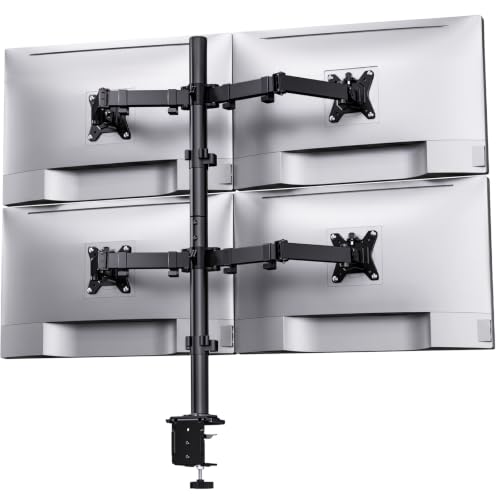
The initial consideration when selecting a multi-display rack is the exact number of screens you intend to suspend. Modern desktop racks accommodate configurations ranging from dual side-by-side displays up to six stacked panels on a central pillar.
Horizontal side-by-side arrangements deliver an expansive panoramic view that benefits audio mixing, financial analysis, and large timeline video rendering. Conversely, stacked two-over-two or vertical arrays save horizontal desk width while keeping secondary status screens comfortably within your upper visual field.
Ensure the rack features sufficient horizontal arm span to support your specific display widths without forcing panels inward. A practical rule of thumb is checking that the combined diagonal measurements of adjacent displays do not exceed the stated manufacturer maximum span.
Weight Capacity and Structural Load Ratings
Every multi-monitor rack carries a defined weight rating per arm that dictates the heaviest display it can safely hold. Exceeding these limits leads to sagging arm joints, unstable tilting, and potential damage to your valuable computer screens.
Standard business monitors typically weigh between seven and fifteen pounds, whereas large curved panels and ultrawide displays can easily exceed twenty pounds. Heavy curved displays also shift the center of gravity forward, placing heightened mechanical leverage on the mounting plate.
Always verify the net weight of your monitors after removing their factory desktop bases before selecting a mounting system. Choosing a rack with at least twenty percent surplus weight capacity per arm ensures dependable long-term stability.
VESA Compatibility and Mounting Plate Mechanics
The Video Electronics Standards Association (VESA) standard defines the square hole pattern on the rear panel of your displays. Most modern computer screens utilize either 75×75 millimeter or 100×100 millimeter screw hole configurations for secure mounting.
Racks engineered with detachable VESA brackets significantly streamline the physical installation process for multi-screen workstations. Detachable brackets allow you to screw the metal plate to the monitor chassis before sliding the display onto the arm assembly.
If your display features a recessed rear housing, verify whether the mounting kit includes standoff spacers and extended mounting bolts. Properly seated VESA plates prevent chassis strain and guarantee that your display locks tightly to the supporting bracket.
Gas Spring Pneumatics vs Mechanical Pole Tensioning
Multi-display desk mounts utilize two primary height adjustment mechanisms: internal gas spring pneumatic cylinders or fixed mechanical pole clamps. Pneumatic arms allow fluid one-handed repositioning without requiring hand tools or manual collar adjustments.
Mechanical pole-mounted racks secure articulated arms to a central vertical steel post using heavy-duty locking screws. While manual repositioning requires loosening a collar, fixed pole systems provide unmatched rigidity for setups that rarely change position.
If you alternate between seated and standing work or frequently collaborate with colleagues, pneumatic gas spring arms deliver superior daily versatility. For static trading desks or monitoring stations, mechanical pole mounts offer rugged durability and dependable alignment.
When planning your complete workstation layout, refer to our comprehensive workspace guides for additional setup optimization advice.
Desk Mounting Method: C-Clamp vs Grommet Base
Secure attachment to your desktop surface is vital to prevent multi-screen racks from tipping forward under heavy mechanical load. Standard mounting systems incorporate dual installation options, including edge C-clamps and through-hole grommet brackets.
A heavy-duty C-clamp fastens firmly to the rear overhang of your desktop without requiring drilling or permanent furniture modifications. Check your desk thickness against the clamp specifications, which typically accommodate tops ranging from 0.4 inches up to 3.5 inches.
Grommet mounts utilize an existing cable management hole or a drilled opening to clamp the base plate directly through the desktop. Grommet installation provides superior stability for deep desks and allows you to position heavy multi-screen arrays flush against an office wall.
Articulation Range: Tilt, Swivel, and 360-Degree Rotation
Precise mechanical articulation allows you to customize viewing angles to eliminate overhead glare and maintain healthy cervical spine posture. Look for mounts providing upward tilt of at least 45 degrees and lateral swivel of 90 degrees in both directions.
Full 360-degree rotation allows you to switch any connected display between horizontal landscape and vertical portrait viewing effortlessly. Portrait orientation is highly beneficial for reading long documents, reviewing lines of code, and scanning financial data feeds.
High-end racks also include independent micro-leveling screws on each VESA head to correct subtle height differences between displays. Micro-adjustment prevents annoying vertical gaps between adjacent bezels, creating a smooth visual transition across all screens.
| Mount Configuration | Screen Range | Ideal Load Capacity | Primary Mounting Style | Best Application |
|---|---|---|---|---|
| Dual Dynamic Arm | 13 to 32 Inches | 17.6 to 19.8 lbs per arm | C-Clamp or Grommet | Everyday Office Multitasking |
| Triple Ultrawide Mount | Up to 49 Inches Center | 26.4 to 44.0 lbs per arm | Reinforced Heavy C-Clamp | Flight Sims, Gaming, Video Production |
| Quad Stacked Steel Rack | 13 to 32 Inches | 22.0 lbs per arm | High-Contact Steel Base | Security, Dispatch, Financial Trading |
| Six Display Matrix System | 17 to 32 Inches | 17.6 lbs per arm | Dual-Pole Clamp Base | Network Operations and Data Centers |
| Multi-Screen Shelf Riser | Dual or Triple Displays | 50.0 to 55.0 lbs total | Freestanding Desktop Riser | Desks Incompatible with Clamps |
Desktop Clearance and Integrated Cable Management
Elevating several computer screens above your desk frees considerable square footage for audio gear, drawing tablets, notebooks, and reference materials. This vertical clearance dramatically improves workflow efficiency by keeping your physical workspace neat and uncluttered.
Managing power cables and video connections across three or four screens requires well-designed integrated routing channels. Quality racks feature detachable plastic raceways along the articulated arms and clip-on organizers on the central pole.
Always route your cables with extra slack around articulating joints to avoid pulling or bending ports when extending the arms. Properly dressed cabling maintains a polished visual appearance while protecting delicate display ports from stress.
Solid Riser Stands vs Suspended Articulating Racks
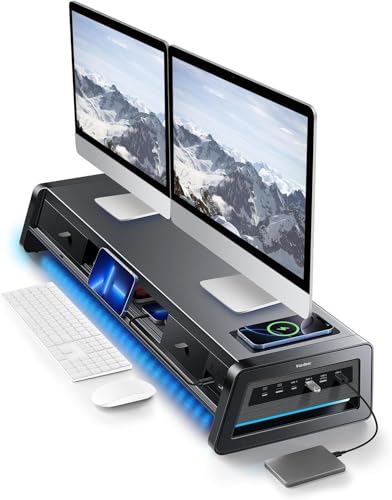
While suspended articulated arms offer maximum positioning flexibility, freestanding multi-monitor shelf risers represent a dependable alternative. Solid wood or steel risers elevate multiple displays using sturdy legs resting directly on the desk top.
Shelf risers frequently incorporate auxiliary storage drawers, built-in USB hubs, and dedicated wireless smartphone charging pads. They require zero desk lip clearance and install instantly without any clamping force on the furniture edges.
However, freestanding shelf risers lack individual screen tilt, height customization, and screen rotation capabilities. Choose suspended mechanical arms for total ergonomic customization, or select a shelf riser for convenient surface storage and zero assembly complexity.
Build Materials and Wobble Resistance
The structural rigidity of your multi-monitor rack directly influences whether your displays stay stable or wobble while you type. Heavy cold-rolled steel and cast aluminum alloy construction minimize desktop vibration and prevent structural fatigue.
Pay close attention to the thickness of the base clamping plate and the diameter of the central vertical support column. A wider base footprint distributes mechanical leverage broadly across the desktop, preventing localized compression damage on wooden surfaces.
Periodically inspecting and tightening mechanical tension bolts ensures your rack retains firm resistance over years of regular use. High-grade hardware resists stripping and maintains smooth articulation across thousands of movement cycles.
Why You Should Trust Us
Our product evaluations stem from meticulous technical analysis of mechanical blueprints, structural load ratings, and hardware material certifications. We examine manufacturer specifications, joint stress data, and desktop thickness tolerances to deliver reliable hardware recommendations.
We compare articulation tolerances, clamp footprint designs, and VESA compatibility patterns across diverse workstation setups. By analyzing user feedback and long-term durability metrics, we identify models that maintain rock-solid stability without sagging under daily use.
Our objective comparisons stay current with evolving workspace hardware trends, supporting both traditional monitors and ultra-heavy curved displays. We provide transparent, data-driven buying guidance to help you make well-informed hardware investments.
Final Thoughts
Selecting the optimal screen rack transforms your workspace into an efficient, ergonomic command center tailored to your daily tasks. For expansive four-display installations requiring rock-solid steel stability and vertical stacking, we recommend the HUANUO Quad Monitor Mount for 13-32 Inch Screens as our top overall multi-screen workstation pick.
If you need an affordable, dependable mounting solution for a standard dual-screen workstation, the ErGear Dual Monitor Stand delivers exceptional value and versatile full-motion movement. It elevates two standard displays with ease while preserving valuable desktop room for other office essentials.
Power users who operate massive curved displays alongside secondary panels will appreciate the high weight capacity of the VIVO Pneumatic Arm Triple Ultrawide Monitor Extra. Its heavy-duty cast aluminum structure and pneumatic counterbalance arms support substantial ultrawide setups without drooping.
For workspaces where clamping is impractical, the Vaydeer All-in-One Dual Monitor Stand Riser with 2 offers integrated USB charging and organized storage. Explore our home and living ergonomic solutions to complete your ideal desk configuration.
Frequently Asked Questions
What is the Best Multi Monitor Rack for Desks to hold three large screens in 2026?
The Triple Monitor Mount up to 49 inches is an outstanding choice for three-screen setups. It pairs a high-capacity center mount for large displays with dual gas spring side arms for seamless panoramic alignment.
Can a multi-monitor desk mount damage a hollow-core or glass desk?
Clamping a heavy multi-screen rack onto glass or hollow honeycomb particleboard can cause localized cracking under concentrated mechanical pressure. For hollow or tempered glass tables, use a freestanding shelf riser or place a solid wood reinforcement plate beneath the clamp.
How do I know if my screens are VESA compatible with the Best Multi Monitor Rack for Desks?
Inspect the rear panel of each computer monitor for four threaded screw holes arranged in a square pattern. Measure the distance between the holes to confirm whether your screen matches standard 75×75 millimeter or 100×100 millimeter VESA dimensions.
What is the difference between gas spring and mechanical multi-monitor arms?
Gas spring arms incorporate pressurized pneumatic cylinders that counterbalance screen weight for smooth, tool-free repositioning. Mechanical arms clamp tightly to a vertical steel column, providing a rigid, budget-friendly setup that holds monitors in a fixed position.
How much weight can a heavy-duty multi-monitor desk rack support?
Heavy-duty multi-display mounts generally support between 17.6 and 44 pounds per individual arm depending on their engineering. High-capacity cast aluminum brackets are specially reinforced to hold large ultrawide panels without sagging or slipping over time.
Can I position one monitor in portrait mode while keeping others in landscape?
Yes, most articulated multi-screen racks feature 360-degree VESA head rotation on each individual mounting plate. This allows you to orient one display vertically for reading coding scripts while keeping adjacent displays horizontal for widescreen tasks.
Will a multi-monitor clamp work on a motorized standing desk?
Quality multi-monitor desk clamps function reliably on motorized standing desks provided the combined hardware weight does not exceed the desk motor limit. Verify that the desk frame crossbars underneath the desktop leave at least three inches of clamp clearance.
How do I prevent my monitors from sagging or drooping over time?
To stop display drooping, locate the tension adjustment bolt on the tilt joint and tighten it firmly with an Allen wrench. On gas spring arms, turn the counterbalance screw toward the plus symbol until the arm holds the screen weight effortlessly.
Is a dual C-clamp mount sturdier than a single grommet mount?
Dual C-clamp structures distribute heavy rotational leverage across a wider section of your desk edge, reducing wobble during typing. However, a properly fastened grommet mount through solid wood provides equivalent structural strength and a cleaner rear profile.
How much clearance behind the desk do articulating multi-monitor arms require?
Fully articulated multi-joint arms generally require between four and eight inches of rear wall clearance when pushed back. If your desk sits flush against a wall, consider a vertical pole-mounted rack with shorter segmented arm links to save space.










Write Your Review
No reviews yet. Be the first to share your experience!