

Cable drag and cluttered desks can hold back your aim and break immersion during high-stakes competitive matches. Modern 2.4 GHz wireless protocols have eliminated input latency, giving desktop gamers the freedom of a cable-free surface without sacrificing competitive precision.
Upgrading to the Best PC Wireless Gaming Keyboards and Mouse sets allows you to control multiple rigs, switch between low-profile typing and rapid mechanical actuation, and enjoy long battery reserves. In this September 2026 roundup, we evaluated 6 distinct bundles from industry leaders like LexonElec, Logitech G, Redragon across varying price points.
Whether you need an ultralight setup for fast first-person shooters or an ergonomic full-sized layout for marathon strategy sessions, matching the right switch feel and sensor grade is essential. Maintaining a clean workspace also pairs well with broader home organization, as outlined in our workspace recycling setups guide.

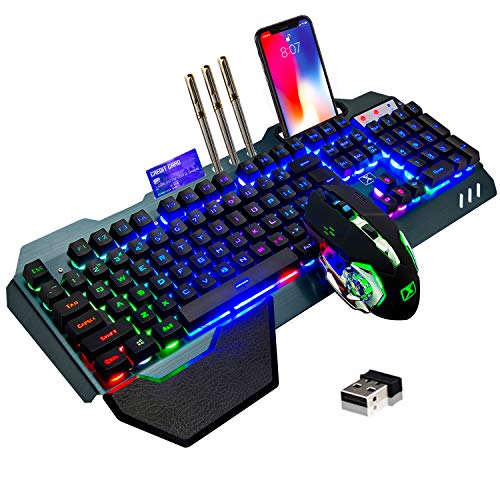


1. Wireless Protocol and Connection Latency
Wireless connection type is the foundational spec that determines how quickly your inputs register on screen. High-performance gaming gear relies on proprietary 2.4 GHz RF connections rather than standard Bluetooth. This dedicated wireless band achieves a 1-millisecond response rate, matching high-end wired peripherals.
Bluetooth is convenient for pairing with tablets, secondary laptops, or office machines, but it introduces polling latency that degrades competitive gaming performance. Look for tri-mode devices that give you 2.4 GHz wireless, Bluetooth, and a USB-C wired connection mode for total versatility. Tri-mode options let you toggle between a work laptop and a gaming rig with a simple switch.
When shopping, check if the combo uses a single unified 2-in-1 USB dongle or requires separate USB receivers for keyboard and mouse. A single unified receiver saves precious USB ports on your PC case while reducing signal interference. As a practical rule, keep your USB receiver within twelve inches of your mousepad using an extension dock to prevent packet drops.
2. Keyboard Switch Types and Actuation Feel
The mechanical switches under your keycaps dictate typing speed, acoustic volume, and tactile feedback. True mechanical switches use individual physical stems and metal contacts, delivering distinct actuation points and fast reset times. Membrane or mechanical-feel keyboards use rubber domes beneath the keys, providing quieter keystrokes at a lower cost tier.
Low-profile mechanical switches, such as factory-lubed GL tactile switches, reduce total key travel and wrist strain. Shorter actuation distances mean your abilities trigger faster in fast-paced games like shooters and MOBAs. Tactile switches give a gentle physical bump when registered, while linear switches glide smoothly without interruption.
If you share a room or stream late at night, consider switch noise alongside responsiveness. Mechanical switches with dampening foam or pre-lubricated housings produce a deep, satisfying sound rather than a sharp click. Rule of thumb: choose tactile or linear mechanical switches for competitive esports, and membrane or cushioned designs for shared living spaces.
3. Mouse Optical Sensor and Tracking Precision
A gaming mouse is only as reliable as its optical sensor. Top-tier sensors track surface micro-textures with zero hardware acceleration, smoothing, or pixel skipping. This ensures that moving your hand two inches across your pad moves your crosshair the exact same pixel distance every time.
Sensors are rated by DPI (dots per inch), IPS (inches per second), and maximum acceleration forces. High DPI ceilings up to 10,000 or 25,600 allow fine sensitivity tuning across 4K displays. High IPS ratings ensure the sensor maintains tracking accuracy even during rapid, sweeping arm flicks across an extended mousepad.
Always verify whether the mouse provides on-the-fly DPI buttons or dedicated software profiles. An onboard DPI shift switch lets you drop sensitivity instantly for precise long-range aiming. For consistent muscle memory, keep your Windows pointer speed at the default middle notch and calibrate your aiming purely through the mouse hardware settings.
4. Battery Capacity and Power Management
Wireless peripherals require dependable power delivery so you never suffer unexpected disconnects mid-session. Battery designs split between internal rechargeable lithium-ion cells and replaceable AA batteries. Rechargeable units charge over USB-C, while replaceable battery designs eliminate cable charging entirely.
Battery longevity varies dramatically depending on whether your RGB backlighting is turned on or off. A keyboard with dynamic multi-zone backlighting may last between 30 and 40 continuous hours, but turning lighting off can extend runtime past 200 hours. Advanced power-saving features include automatic sleep timers that wake the device instantly upon touch.
To avoid sudden dropouts, select peripherals that feature multi-stage LED battery gauges or desktop software notifications. Some premium mice also support continuous wireless inductive charging pads. If you game heavily each day, set your backlighting brightness to fifty percent to double your operating runtime between recharge cycles.
5. Keyboard Form Factor and Ergonomics
Keyboard layouts range from full-sized 104-key boards down to compact tenkeyless (TKL) and 60-percent models. Full-sized keyboards retain a dedicated numeric keypad and individual arrow clusters, making them practical for data entry and complex simulation games. However, their wider footprint consumes valuable desk real estate.
Tenkeyless keyboards cut the numpad, allowing you to position your mouse closer to your natural shoulder width. This centered posture reduces shoulder fatigue and prevents your mouse from bumping into the keyboard chassis during wide swipes. Slim, low-profile chassis designs further reduce wrist extension without demanding bulky wrist pads.
Consider whether you need built-in palm rests or integrated phone cradles for secondary screen monitoring. Aluminum top plates add rigidity, preventing PCB flex when you type aggressively. Choose a TKL format if your primary focus is competitive gaming, or a full-sized layout if you split time evenly between productivity and gaming.
6. Mouse Weight and Grip Ergonomics
Mouse weight and body shape directly influence your control, wrist fatigue, and hand stamina. Ultralight mice weighing between 60g and 70g allow rapid accelerations and effortless micro-adjustments in fast shooters. Ergonomic sculpted mice weighing between 85g and 100g provide thumb rests, extra programmable buttons, and greater stability for palm grippers.
Your grip style determines which mouse profile suits you best. Palm grippers need a pronounced rear hump and contoured finger grooves for full palm support. Claw and fingertip grippers benefit from flatter, ambidextrous shells with narrow waistlines that make lifting and resetting easy.
Check the surface coating and side grip texture before buying. Matte UV coatings and textured side flanks prevent slippage when your palms warm up during intense matches. Pairing your mouse with a smooth desk surface is just as vital as general tabletop maintenance, which you can read about in our countertop and desk surface care review.
7. Anti-Ghosting and Key Rollover Capabilities
Anti-ghosting and rollover specs ensure that every key you press registers accurately, even when striking multiple keys simultaneously. Basic office keyboards struggle when more than three keys are pressed at once, causing missed inputs during complex in-game commands. Gaming keyboards incorporate matrix scanning to prevent this input blockage.
Full N-Key Rollover (NKRO) allows an unlimited number of simultaneous keypresses, guaranteeing total accuracy. Many budget-friendly boards feature 25-key anti-ghosting covering the primary gaming clusters around WASD, Shift, Control, and Spacebar. This focused coverage provides dependable performance for primary game actions without the cost of full NKRO matrix controllers.
Look for hardware-level Windows key lock switches to avoid accidental desktop minimizations during crucial fights. Dedicated multimedia keys also allow you to adjust audio volume and media playback without tabbing out of your game. For fast action titles, verify that your selected keyboard supports at least 25-key anti-ghosting.
8. Software Customization and Onboard Memory
Companion software unlocks the full hardware potential of your keyboard and mouse combination. Dedicated desktop suites let you remap key functions, record complex macro chains, adjust sensor polling rates, and build lighting profiles. Having access to granular DPI stepping allows you to match your preferred sensitivity across different titles.
Onboard memory is a crucial feature that stores your custom key bindings directly onto the peripheral hardware. Once configured, you can take your keyboard and mouse to a tournament or plug them into a secondary PC without reinstalling background software. This keeps your custom profiles active without consuming system background resources.
Software ecosystems that support unified lighting synchronization can harmonize effects across both peripherals. If you prefer a distraction-free setup, look for software that lets you write profiles directly to onboard chips and then close the app. Always check software compatibility with your specific operating system version before completing your build.
Peripheral Feature Comparison
| Feature Category | Entry-Level Combos | Mid-Range Bundles | Flagship Esports Combos |
|---|---|---|---|
| Wireless Tech | 2.4 GHz Single Mode | Tri-Mode (2.4G/BT/Wired) | Proprietary Ultra-Low Latency RF |
| Switch Construction | Membrane / Mechanical Feel | Standard Mechanical or Tri-Mode Hybrid | Factory-Lubed Low Profile Mechanical |
| Mouse Sensor DPI | Up to 2,400 – 4,800 DPI | Up to 10,000 DPI Optical | Sub-Micron Hero / High Precision Optical |
| Key Rollover | Multi-Key Zone Anti-Ghosting | 25-Key Anti-Ghosting Matrix | Full N-Key Rollover (NKRO) |
| Chassis Materials | Brushed Metal or ABS Plastic | Reinforced ABS & Wrist Rests | Aircraft-Grade Aluminum & Double-Shot PBT |
Why You Should Trust Us
Our peripheral analysis methodology is rooted in objective, data-driven technical evaluation. We cross-examine verified hardware specifications, wireless protocol benchmarks, switch actuation tolerances, and sensor tracking metrics. By focusing on verified physical attributes rather than marketing buzzwords, we provide transparent purchasing recommendations.
We shortlisted these wireless combos by evaluating latency consistency, battery longevity under real-world lighting scenarios, and chassis build materials. Each peripheral bundle was evaluated for component harmony, ensuring the paired mouse and keyboard complement each other in latency and utility. Our guides stay continually updated with dynamic data to reflect real-time market availability.
We do not accept paid manufacturer placements or sponsored rankings. Our picks are selected based on value, durability, ergonomic design, and verified performance. This ensures you receive impartial advice tailored to help you build an efficient, clutter-free desktop gaming station.
Final Thoughts
Choosing the right wireless peripheral bundle comes down to balancing switch feedback, mouse ergonomics, and overall budget. Cutting cords eliminates desktop clutter and opens up expansive mousepad area for low-sensitivity aiming. Investing in the right pair ensures crisp response times and dependable stamina through extended gaming sessions.
For gamers demanding tournament-grade performance and premium materials, the Logitech G502 X Plus Lightspeed Wireless paired bundle stands as our best overall recommendation. Its ultra-thin TKL mechanical keyboard features factory-lubed switches and double-shot PBT keycaps, while the paired mouse offers sub-micron optical tracking and hybrid optical-mechanical switches.
If you want exceptional functionality on a sensible budget, the Redragon S107KS Wireless Gaming Keyboard is our best value pick. It delivers versatile tri-mode connectivity, an ultralight 65-gram mouse with up to 10,000 DPI, and robust 25-key anti-ghosting at an accessible price. For casual gamers wanting extended battery life, the Logitech G305 Lightspeed Wireless Gaming Mouse combo provides up to 250 hours of gameplay on a single battery.
Frequently Asked Questions
What is the top-rated option among Best PC Wireless Gaming Keyboards and Mouse sets in 2026?
High-end packages featuring low-profile mechanical switches and sub-micron tracking sensors rank highest for competitive play. These setups offer unified single-dongle pairing, ultra-fast 1-millisecond response rates, and premium double-shot PBT keycaps for durability.
Do wireless gaming keyboards and mice suffer from noticeable input lag?
Modern gaming peripherals using 2.4 GHz wireless protocols have virtually zero discernible latency compared to wired alternatives. They operate at a 1,000 Hz polling rate, registering inputs every single millisecond. Bluetooth connections can introduce slight lag, but dedicated 2.4 GHz USB connections deliver tournament-grade responsiveness.
Can I use a single USB receiver for both the keyboard and mouse?
Many modern wireless combos feature a 2-in-1 unified USB receiver that connects both devices simultaneously. This design saves an extra USB port on your computer and helps minimize wireless interference. Always verify whether the combo supports single-dongle pairing before purchasing.
How long does the battery last on a wireless gaming keyboard?
Battery longevity varies from 30 to over 300 hours depending on backlighting usage and battery capacity. Running vibrant dynamic RGB lighting drains power more quickly, while lowering brightness or switching lighting off dramatically extends battery endurance. Most rechargeable models allow you to continue playing while connected via a USB-C charging cable.
What is the difference between mechanical and mechanical feel keyboards?
True mechanical keyboards use individual physical switches beneath every keycap, offering precise actuation depths and longer switch lifespans. Mechanical feel keyboards use rubber membrane sheets tuned to mimic the tactile bump of a mechanical switch. Mechanical keyboards deliver superior tactile feedback, while membrane hybrids provide quiet operation at an affordable price.
What mouse DPI setting is best for competitive first-person shooters?
Most competitive shooter players prefer setting their mouse between 400 and 1,600 DPI combined with low in-game sensitivity. This combination allows for precise micro-adjustments and smooth tracking using larger arm movements across your desk. High DPI sensors allow you to fine-tune this tracking without pixel skipping or jitter.
Is a Tenkeyless (TKL) keyboard better for gaming than a full-sized keyboard?
Tenkeyless keyboards remove the numeric keypad, giving your mouse hand significantly more physical desk space. This compact format allows for an ergonomic arm position and prevents your mouse from striking the keyboard chassis during fast flicks. Full-sized keyboards remain ideal if you frequently use the numpad for productivity or complex key binds.
What does anti-ghosting mean on a gaming keyboard?
Anti-ghosting is a hardware feature that allows the keyboard matrix to register multiple simultaneous key presses accurately. Without anti-ghosting, pressing several movement and ability keys at once can cause unpressed keys to trigger or real inputs to be ignored. Quality gaming keyboards offer 25-key or full N-key rollover protection.
How do I clean and maintain a wireless gaming keyboard and mouse combo?
Use compressed air to blow out dust and debris from between keycaps and wipe surfaces down with a microfiber cloth. Keeping your gaming station tidy is as simple as managing household chores, which you can read about in our desk and supply cabinet organization guide. Avoid using harsh chemical sprays directly on switch stems or mouse optical sensors.
Can I connect a tri-mode wireless combo to a laptop and desktop at the same time?
Yes, tri-mode peripherals allow you to pair with a primary desktop via the 2.4 GHz USB receiver and connect to a laptop via Bluetooth. You can switch between systems using a physical toggle button on the peripheral chassis. This eliminates the need to unplug cables or switch dongles when moving between work and play.








Write Your Review
No reviews yet. Be the first to share your experience!